Early Windows beta
Prepare photos without online tools or uploads.
Resize, compress, convert and watermark photos for marketplaces, second-hand platforms, web shops and everyday sharing — without uploading them anywhere. No account. No uploads. Originals stay unchanged.
Who is PrepPhoto for?
PrepPhoto is for people who want simple, ready-to-use photo copies for marketplaces, second-hand platforms, web shops and everyday sharing — without complicated photo-editing software.
Simple photo prep for everyday use.
Create useful photo copies without learning complicated editing software.
Prepare and compress
Make large photos smaller and easier to upload or store.
Convert formats
Create JPG, PNG or WebP copies depending on what you need.
Listing photos
Place photos on a clean square background without cropping the original image.
Optional watermark
Add your name, website or brand to the new photo copy.
Batch workflow
Add multiple photos and process them together in one run.
Output report
See what changed: before size, after size, saved space and output location.
Recent choices
Your recent prefix and watermark choices are remembered on this PC.
How it works
A simple workflow that keeps the original photo safe.
Choose images or import a whole folder.
Pick marketplace, square, small upload, WebP, text/screenshot or custom settings.
Add a prefix or watermark when useful. Your recent choices are remembered.
Open the output folder and keep your originals untouched.
Simple enough to understand at a glance.
The app keeps the workflow visible: selected photos, preview, goal, output folder and the convert button.
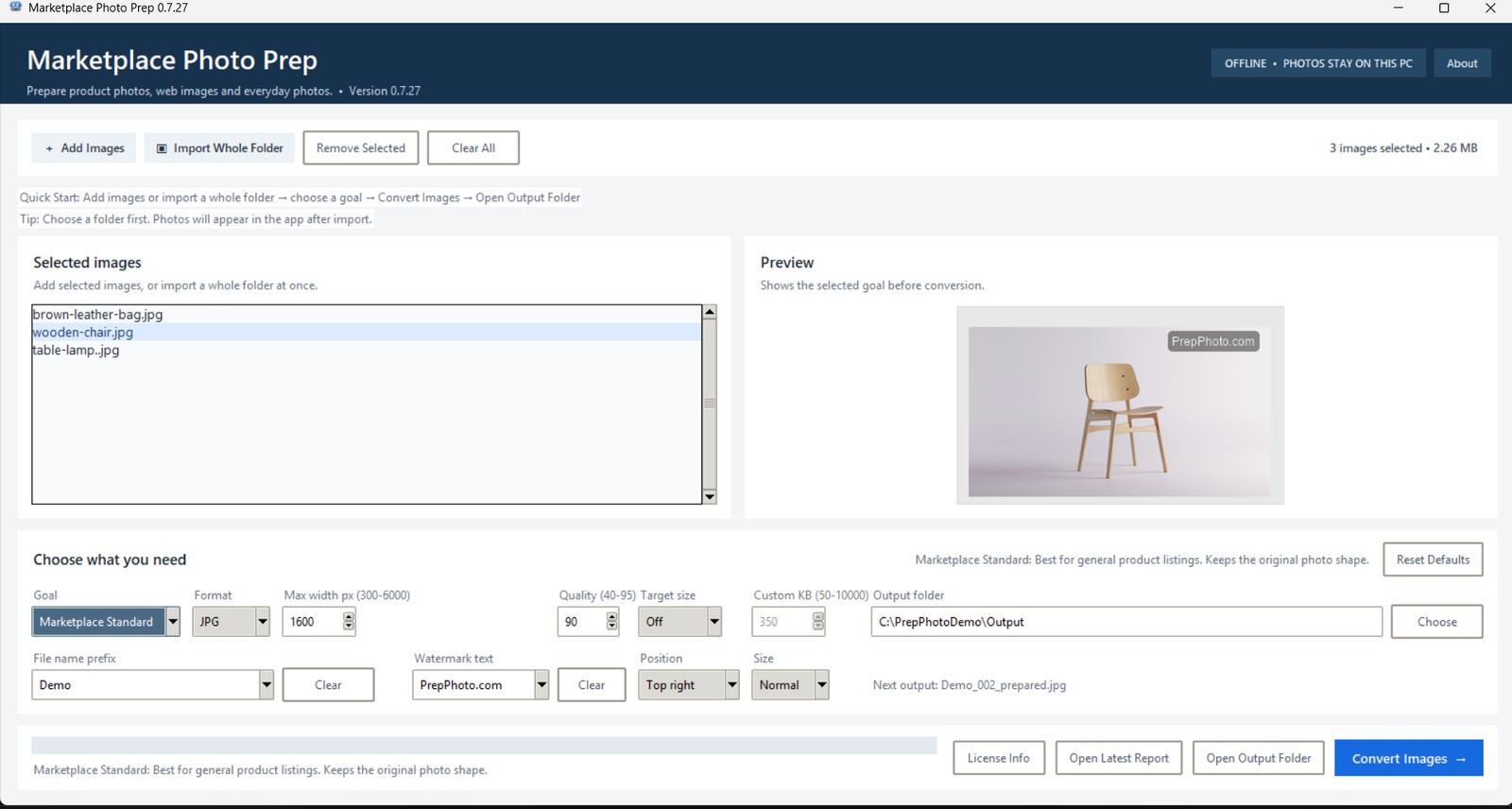
Built around trust.
PrepPhoto keeps photo preparation local, clear and easy to understand.
Photos stay on your PC
PrepPhoto does not upload your photos online for editing.
Originals stay unchanged
The app saves new prepared copies. Your original photos are not overwritten.
No account needed
Open the app and prepare photos without creating another online account.
Download the Windows beta
Current test version: Marketplace Photo Prep 0.7.27.
Download → Open → Install → Start PrepPhoto.
- Windows installer: MarketplacePhotoPrep_Setup_0.7.27.exe
- No account or photo uploads.
- Original photos stay unchanged.
- Recent prefix and watermark choices are remembered.
Download the Windows installer, open it and follow the setup steps. By using the beta, you agree to the Beta License. Read the Privacy page.
Beta feedback helps improve PrepPhoto.
In the first beta phase, the most useful feedback is simple: was it clear, did it work, and did you find your output photos?
FAQ
Are my photos uploaded online?
No. PrepPhoto prepares photos on your own Windows PC.
Are my original photos changed?
No. The app creates new output copies and keeps your original photos unchanged.
Is the watermark required?
No. Watermark text is optional. Leave the watermark field empty to keep it off.
Who is this app for?
Online sellers, small businesses, website owners and anyone who wants smaller, cleaner photo copies.
Can I use it for Vinted, Etsy or Marktplaats?
Yes. PrepPhoto creates clean photo copies for many selling platforms.
Does it work without an account?
Yes. PrepPhoto works without an account for normal photo preparation.
Does the app remember my recent text?
Yes. Recent prefix and watermark choices are remembered on this PC, so you do not need to retype common names every time.
Why can Windows show a warning?
New independent Windows apps can trigger a warning before they build a download reputation. The app is still designed so your photos stay on your own PC.
Is this the final version?
No. This is an early beta version. The app and screenshot may change as PrepPhoto improves.
What feedback is useful?
The best feedback is simple: was the app clear, did conversion work, did the output folder make sense, and was anything confusing?